
Studiowide Onovo
  • Home
  • About
  • What We Do
  • Our Work
  • News & Insights
  • Toolkit
  • Guides
  • Contact Us
Search

Explore our work, services, toolkit and insights.

Home/Guides/Marketing Automation

Studiowide Marketing Automation & CRM

Contacts and segmentation

How to check a contact’s email subscription status

Find a contact’s opt-in status, see how it affects email eligibility and check that unsubscribed contacts stay out of campaigns.

What you’ll achieve

Know whether to include the contact when reviewing a marketing email audience.

On this page

  • Find the contact’s opt-in status
  • What the status means for email campaigns
  • Example of reviewing a demo invitation

In the Studiowide Marketing Automation & CRM system, open the person’s record in Contacts and check their Opt-in Status. Use it alongside their recorded email preferences and your team’s marketing rules to decide whether to include them in a campaign.

Find the contact’s opt-in status

  1. Search Contacts using the person’s full email address and open the matching record.
  2. Check the status shown with the contact details or look for Opt-in Status under General in the contact editor if your role can see it.
  3. Review any available preference or consent information on the record. If there’s a mismatch with a recent opt-out, keep the contact out of the send while you check which choice is current.
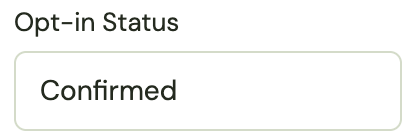
Opt-in Status field showing Confirmed in the contact editor.
This demo contact shows Confirmed. Check the contact’s recorded preferences before including them in a marketing campaign.

What the status means for email campaigns

  • Confirmed. The record shows a confirmed address. Check the contact’s preferences and the intended type of message before including them.
  • Unconfirmed. Check what you know about the contact’s email preferences and how the workspace treats that status. If the contact’s permission is unclear, leave them out of the campaign.
  • Unsubscribed. Keep the contact out of marketing email. Their record can still hold the history your team needs to honour the choice.
  • Bounced, Complained or Blocked. Keep the contact out of the marketing audience. If an address appears wrong, check it through your team’s agreed process and preserve the contact’s recorded preferences.

In Contacts, use Opt-in Status to inspect specific groups or Marketable when checking which contacts the CRM treats as eligible. Review the final audience before scheduling. See the ICO’s guidance on respecting marketing preferences.

Example of reviewing a demo invitation

If a contact is missing despite the status you expected, check why a contact is absent from an email campaign audience. If the contact is eligible but an expected automated message has not arrived, use the automated-email checks to investigate the flow and its recorded activity.

A buyer is tagged as interested in an inspection system, but their status is Unsubscribed. Leave them out of the demo campaign and keep their enquiry history and opt-out on the contact record. Check the campaign’s final recipients to make sure the exclusion worked.

See how to check the recipients of an email campaign.

Keep going

Related guides

  • How to build and save an email audience↗

    Use include and exclude filters to build a CRM audience, check sample contacts and save the search for your next email campaign.

← Browse all guide topics

BEYOND DIGITAL

Beyond Digital

AI consultancy for marketing functions

Access Our Toolkit
Newsletter Form
Sign Up To Get The Latest Tools & Insights

By subscribing, you request the Studiowide newsletter. Read our privacy policy. This site is protected by reCAPTCHA and the Google Privacy Policy and Terms of Service apply.

Studiowide logo

Our marketing is built on smart strategies designed to help you hit your goals. Every step is purposeful and focused on delivering results that grow your business, connect with your audience, and build demand.

Quick Links
  • About
  • What We Do
  • Our Work
  • News & Insights
  • Toolkit
  • Guides
Get in Touch

Get in Touch Via WhatsApp

Studiowide Ltd, 16 Jordan Street, Liverpool. L1 0BP. Tel: 0151 708 5678 | hello@studiowide.co.uk

© 2026 Studiowide | Environmental Policy | Equal Opportunities Policy | T&C's | Privacy Policy
Manage Consent

We use cookies to keep our website running smoothly and, with your permission, understand how you use it. This helps us improve our content and make your visits more useful. You can choose which cookies to allow and change your preferences at any time.

Functional Always active
The technical storage or access is strictly necessary for the legitimate purpose of enabling the use of a specific service explicitly requested by the subscriber or user, or for the sole purpose of carrying out the transmission of a communication over an electronic communications network.
Preferences
The technical storage or access is necessary for the legitimate purpose of storing preferences that are not requested by the subscriber or user.
Statistics
The technical storage or access that is used exclusively for statistical purposes. The technical storage or access that is used exclusively for anonymous statistical purposes. Without a subpoena, voluntary compliance on the part of your Internet Service Provider, or additional records from a third party, information stored or retrieved for this purpose alone cannot usually be used to identify you.
Marketing
The technical storage or access is required to create user profiles to send advertising, or to track the user on a website or across several websites for similar marketing purposes.
  • Manage options
  • Manage services
  • Manage {vendor_count} vendors
  • Read more about these purposes
View preferences
  • {title}
  • {title}
  • {title}