

A lead nurture flow should stop when sales takes over. In the Studiowide Marketing Automation & CRM system, use a dedicated handover tag as an exit trigger and check for that tag before each nurture email. Assigning an owner alone is not the stop rule in this example.
Worked example: move Alex from helpful content to a sales conversation
Alex enquires about new equipment. Marketing sends an acknowledgement and a product-selection guide, then plans a follow-up two days later. When Alex requests a demonstration, the team records the handover, assigns the right salesperson, sends an internal alert and creates a dated task. The generic nurture messages should end so the salesperson can continue the conversation. This is an illustrative process; the screenshots show its stop controls in an inactive demo flow.
1. Make the handover a clear recorded event
- Agree the tag that means sales has taken responsibility. Our example uses DEMO – Sales handover; use your team’s agreed tag for real contacts.
- Keep product interest in the relevant field and retain the enquiry-source tag, so the salesperson can see what Alex asked for and where the enquiry came from.
- At handover, assign the salesperson, provide the enquiry details in an internal alert and create a task with an explicit next action and deadline. Record the handover tag as part of that same process.
Follow the sales handover walkthrough for the complete journey. Use product or region routing to choose an owner and follow-up deadlines to make the next action visible.
2. Add a downstream handover exit
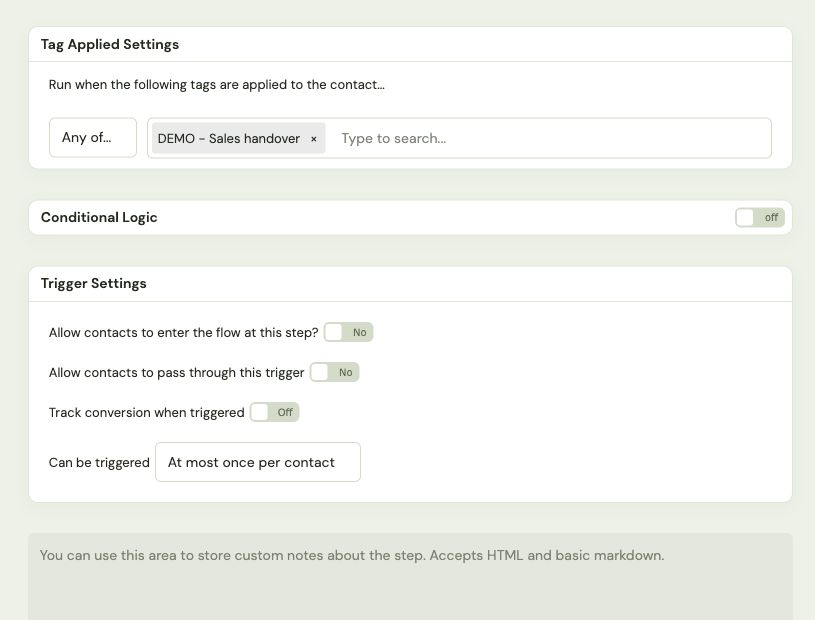
- Open the inactive nurture flow in Flows. After the final nurture action, add a Tag Applied trigger on the same path.
- Select the sales-handover tag. Set Allow contacts to enter at this step? to No. This exit is for contacts already in the sequence.
- Set Allow contacts to pass through this trigger to No. Let the trigger lead straight to End, with no further nurture email after it.
- Choose At most once per contact for this handover event. Check the position carefully: a later trigger can bring an eligible contact forward to that point; it is not a universal exit from every unrelated branch or flow.
3. Check eligibility immediately before each nurture email
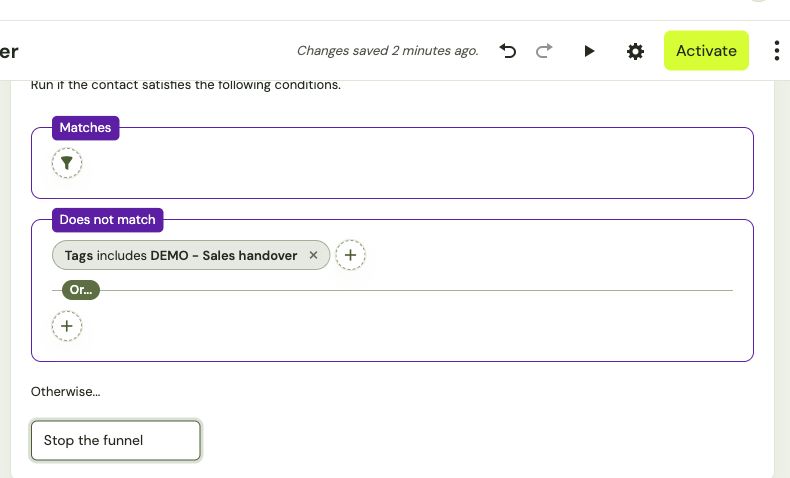
- Open a nurture Send Email action and switch Conditional Logic on.
- In Does not match, add a Tags condition that includes the sales-handover tag. This means the email can run only when that tag is absent.
- Under Otherwise, choose Stop the funnel, the label shown in this control. Save the filter using its tick button.
- Repeat the check before every promotional nurture email, including the first one. An existing handover tag must block a message even if there is no new tag-applied event during the flow.
4. Test both sides of the handover
Use the simulator with Dry run On and a demo contact. First trace the route without a handover tag. Then test a demo contact carrying the handover tag from before the email action: it should stop rather than continue through that email. Also check the downstream exit when the handover event happens during a waiting period. Do not assume that an owner change, a reply or a stage change adds the tag unless that action is explicitly included in your process.
Check the result and improve the process as volume grows
If a nurture email has not arrived, follow the automated-email troubleshooting checks to establish whether the sales handover correctly stopped it before restarting any follow-up.
The desired result is one clear owner, one dated next task and no further generic nurture after handover. If messages continue, check the exact tag, the condition on every email and the exit’s position on the same path. If contacts stop too early, check who applied the handover tag and whether the tag has been reused for another purpose.
As enquiry volume grows, split ownership by product or region while keeping one consistent handover definition. Review task completion and unanswered enquiries alongside engagement: a click is a signal of interest, while a named salesperson and a completed next action show that the conversation is being handled.